 Default Bank Account Per Payment Type And Warehouse
| Document Version | v.1 |
|---|---|
| Document Last Updated | 4/22/25 |
| Software Version Documented | v.10 |
Overview
Savance has the ability to be able to Default Bank Account based on Payment Type and Warehouse.
For instance, checks might be deposited in one bank account and credit cards in another. Likewise, different Warehouses may be in different areas, thus deposits for those Warehouses going into different bank accounts.
This setting comes into effect in the Record Deposits Screen.
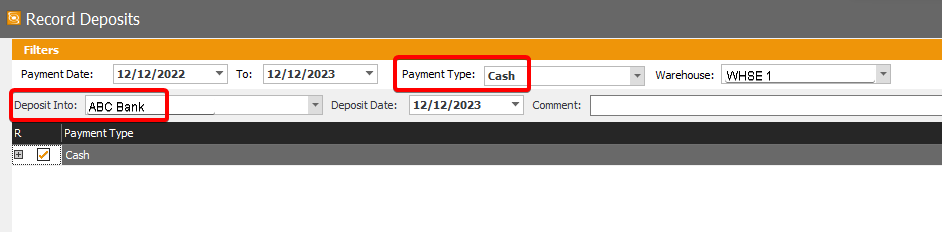
Previously, Deposit Into field in Record Deposits defaulted to set Default Bank Account in Admin, Administrator, Sites, Accounting Settings, Default Bank Account and not by Payment Type or Warehouse.

Administrative Settings
Payment Type Setting to Assign Default Bank Account
- In Admin, Administrator, Payment Types, combobox for “Default Bank Account” by default will be set to “*Inherit*” coming from Admin, Administrator, Sites, Accounting Settings, Default Bank Account, but can change if desired for that Payment Type.
Payment Type Setting to Assign Default Bank Account Per Warehouse
- Below that setting, checkbox setting called “Assign Default Bank Account for this Payment Type by Warehouse”

-
If this is NOT checked, system will look at user’s Default Bank Account which could be Warehouse’s Default Bank Account.
-
If this is checked, grid with Warehouse column and Default Bank Account column will become enabled.
-
List each Warehouse and Default Bank Account column should have combobox listing each active bank account.
-
This should be available to set on each Payment Type.
-
If user checks checkbox, then assigns each Warehouse bank, but decides to uncheck setting, all selections will revert back to default “inherited”
Assign Default Bank Account for Payment Type and Then by Warehouse
Default Bank Account Per Payment Type
-
Click Edit (or create new Payment Type)
-
Click into combobox for bank account
-
See list of existing bank accounts
-
Select bank account
-
Do NOT differentiate by Warehouse
-
So Default Bank Account for that Payment Type will be same for all Warehouses
Default Bank Account Per Payment Type AND Per Warehouse
Assign a bank account to Payment Type open Payment Types tab in Admin, Administrator. See combobox to assign Default Bank Account to Payment Type
-
Select checkbox that allows you to assign Default Bank Account to each Warehouse for that Payment Type
- Listing each Warehouse
-
comboboxes by each Warehouse enables
-
Select Default Bank Account for each Warehouse for Payment Type
-
Click Update
Security for Ability to Change Default Bank Account
-
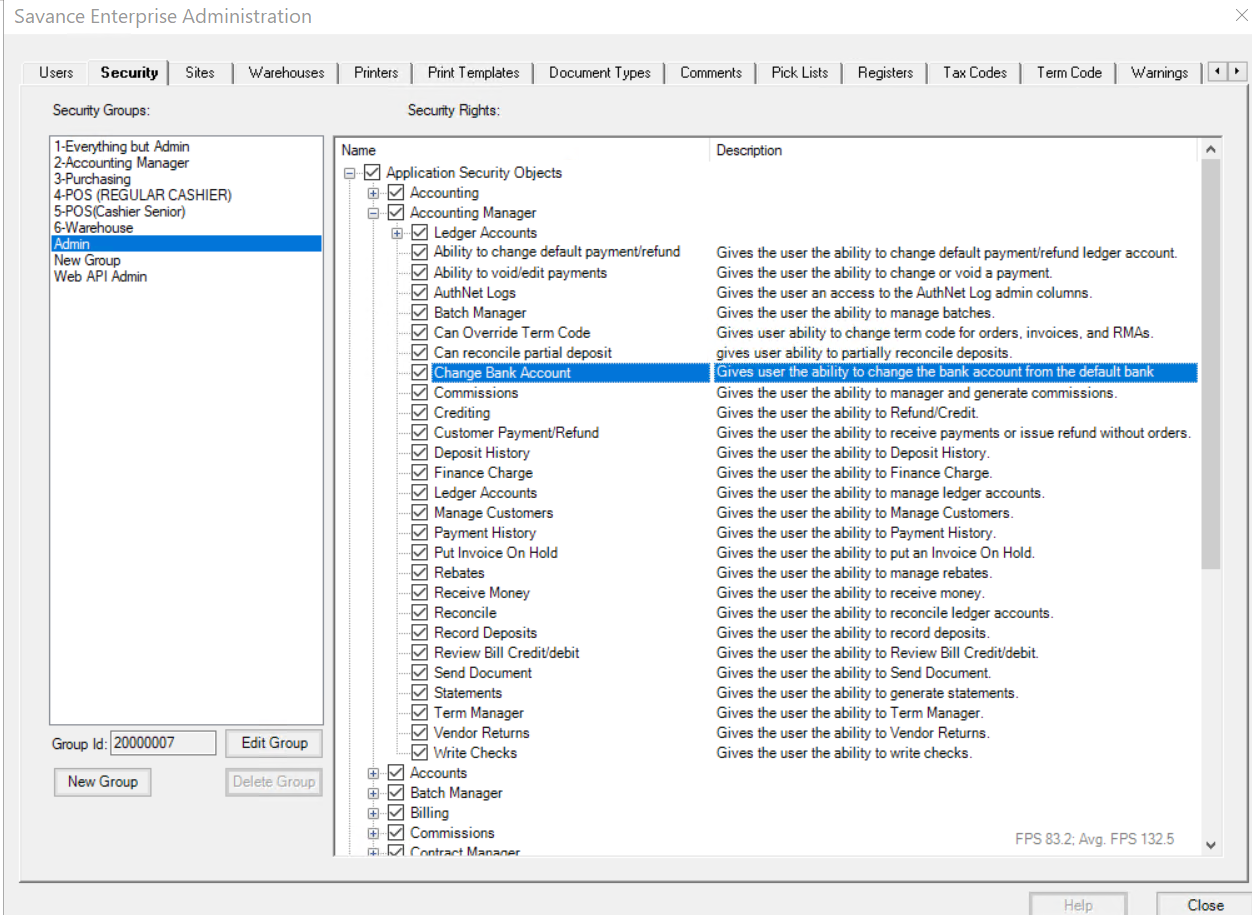
Admin, Administrator, Security - Accounting Manager called “Change Bank Account”
- Description: “Gives user ability to change bank account from Default Bank Account.”
-
If the user has this, they will have the ability to change their bank account on this screen. If not, deposit info combobox will be disabled and can only process into Default Bank Account.
Record Deposits Screens Scenarios
Navigate to Accounting>Accounting Manager>Record Deposits
All Warehouses - Does NOT Assign Bank Per Payment Type Per Warehouse
-
Open Record Deposits screen
-
Each Payment Type has Default Bank Account
-
But for all Warehouses (does not use per Warehouse setting)
-
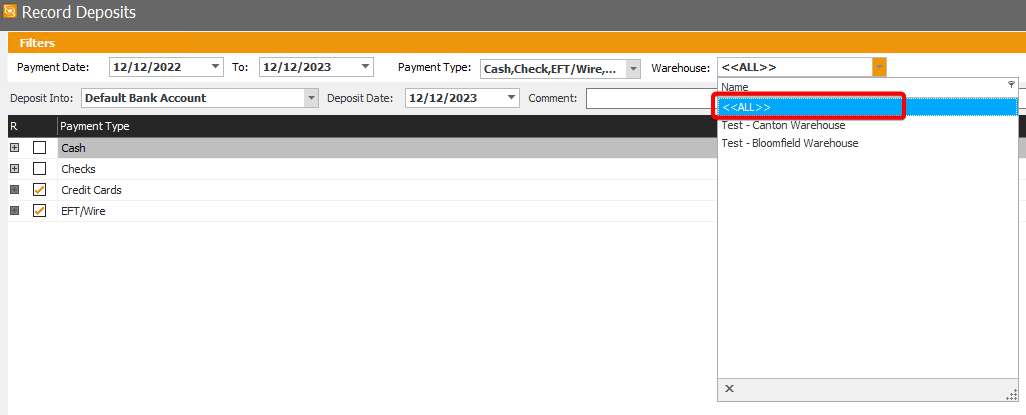
Warehouse combobox defaults to All
-
Or can change to specific Warehouse
-
Choose Payment Type
-
Able to process all transactions for that Payment Type for all Warehouses
Per Warehouse
-
Open Record Deposits screen
-
Each Payment Type has Default Bank Account per Warehouse
-
Default Warehouse is set to Warehouse set in Admin
-
But can change it
-
Select Payment Type for specific Warehouse
-
Bank account refreshes to its Default Bank Account
Select Multi Payment Type - Same Bank - All Warehouses
-
Open Record Deposits screen
-
Each Payment Type has Default Bank Account
-
But some Payment Types share same Default Bank Account
-
But for all Warehouses (does not use per Warehouse setting)
-
see Warehouse combobox defaults to All
-
Or can change to specific Warehouse
-
select Payment Type share same Default Bank Account
-
those Payment Type lines appear in grid
- can view transactions
-
am able to checkmark each line and process together
-
Since they all share same Default Bank Account
Select Multi Payment Type - Same Bank - Per Warehouse
-
Open Record Deposits screen
-
Warehouse combobox defaults to my Warehouse
-
Or can change to different Warehouse
-
select Payment Types i know share same Default Bank Account in that Warehouse
-
those Payment Type lines appear in grid
- can view transactions
-
am able to checkmark each line and process together
-
Since they all share same Default Bank Account
Select Multi Payment Type - Different Bank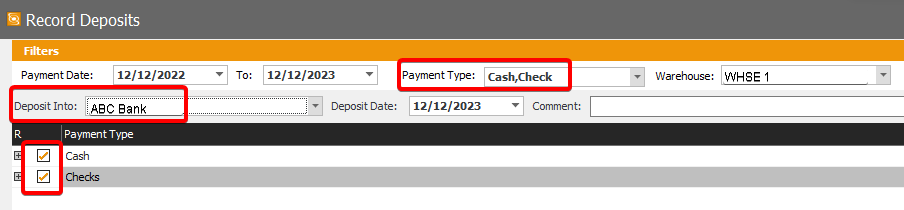
Some Payment Types DO NOT share same Default Bank Account for all Warehouses (does not use per Warehouse setting)
-
Open Record Deposits screen
-
see Warehouse combobox defaults to All
-
Or can change to specific Warehouse
-
select Payment Types that do NOT share same Default Bank Account
-
those Payment Type lines appear in grid
- can view transactions
-
checkmark one of lines (by Payment Type)
-
check on line (Payment Type) that does not share same Default Bank Account as one i selected first
-
A dialog box appears stating:
- “These Payment Types do not share same Default Bank Account. Do you want to uncheck previously selected Payment Types and continue with this Payment Type and its Default Bank Account?”
-
Options are to Click yes or no
-
Click No
-
line tried to check is NOT checked
-
line/s already selected are STILL checked
-
try to checkmark that line again
-
A dialog box appears stating:
- “These Payment Types do not share same Default Bank Account. Do you want to uncheck previously selected Payment Types and continue with this Payment Type and itsDefault Bank Account?”
-
Options are to Click yes or no
-
Click Yes
-
Line just tried to check is now checked
-
Previously checked line/s are no longer checked
-
Can only process transactions per Default Bank Account but for any or all Warehouse

-
Options are to Click yes or no
-
Click No
-
Line tried to check is NOT checked
-
Line/s already selected are STILL checked
-
Try to checkmark that line again
-
A dialog box appears stating:
- “These Payment Types do not share same Default Bank Account. Do you want to uncheck previously selected Payment Types and continue with this Payment Type and its Default Bank Account?”
-
Options are to Click yes or no
-
Click Yes
-
Line just tried to check is now checked
-
Previously checked line/s are no longer checked
-
Can only process transactions per Default Bank Account per Warehouse
